
Screenshots



Introduction
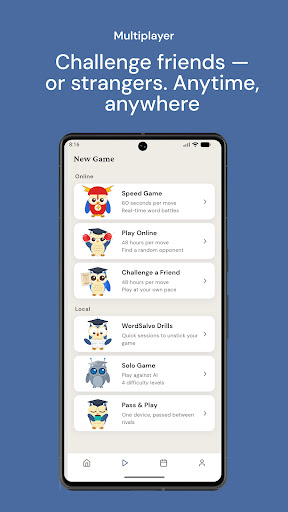
WordSalvo: 2 Player Word Game is an engaging multiplayer word game developed by Netkreatives that invites players to challenge their vocabulary skills in a classic board-and-rack setting. This app is perfect for fans of word games who enjoy playing with friends or matched opponents. Whether you want to engage in local matches on a single device, compete against friends online, or practice with AI opponents, WordSalvo offers a versatile gaming experience. The game features daily word puzzles, in-depth post-game analysis, and various competitive modes, making it a comprehensive platform for both casual and serious word enthusiasts.
Graphics & Gameplay
The visual design of WordSalvo is clean and user-friendly, emphasizing functionality over distractions. The main gameplay interface is intuitive, featuring a classic word board where players can drag and drop their letter tiles to form words. The tiles are visually distinct, showcasing vibrant colors that enhance readability. Each game session is further enriched by a well-organized layout that includes accessible menus for settings, daily challenges, and tournaments.
Based on the screenshots, players can expect a polished aesthetic with a contemporary touch. The graphics depict a smooth user experience, with animations that are swift and responsive, ensuring that players remain immersed in the game. The scoreboard and analytics sections are neatly presented, allowing users to review their performance and strategies effectively. Overall, the graphics and gameplay mechanics are designed to enhance the user experience, making it both visually appealing and engaging.
Key Features
- Real Multiplayer Matches: Engage in classic turn-based matches with friends or matched opponents online.
- Local Play: Play against someone beside you on a single device for a more intimate gaming experience.
- Daily Word Puzzles: Test your skills with a unique daily challenge, climbing leaderboards and building streaks.
- Post-Game Analysis: Learn from your matches with detailed feedback including brilliancy scores and suggestions for better moves.
- AI Practice: Play against clearly labelled AI opponents to sharpen your skills without the pressure of competing against real players.
- Tournaments and Ratings: Participate in seasonal tournaments and track your progress with detailed ratings and standings.
- Word Drills and Flash Cards: Improve your vocabulary with targeted drills and flashcards that focus on important word patterns and strategies.
- Customizable Experience: Personalize your board with premium themes and tile styles, enhancing the aesthetic without affecting gameplay.
Mod Features
For those seeking an enhanced gaming experience, consider these plausible mod features that could elevate your gameplay:
- Premium Unlocked: Gain access to all premium themes and tile styles without any additional costs, allowing for a fully customized board experience.
- No Ads: Enjoy uninterrupted gameplay with a mod that removes all advertisements, letting you focus on forming words without distractions.
- Unlimited Money: Accumulate unlimited in-game currency to unlock any features or power-ups you desire instantly, enhancing your competitive edge.
- Enhanced AI Competitors: Challenge improved AI opponents that simulate real player strategies, offering a more robust practice environment.
- Unlock All Tournaments: Instantly gain access to all tournament levels, allowing you to compete at the highest ranks without restrictions.
How to Install APK on Android
Installing the WordSalvo APK on your Android device is a straightforward process. Follow these steps to get started:
- Enable Unknown Sources: Go to your device’s Settings, then Security, and enable Unknown Sources to allow installations from sources other than the Play Store.
- Download the APK: Click on the download link provided at the end of this guide to download the WordSalvo APK file.
- Locate the File: Open your device's File Manager and navigate to the Downloads folder to find the downloaded APK.
- Install the APK: Tap on the APK file to initiate the installation process. Follow the on-screen instructions to complete the installation.
- Launch the Game: After installation, find the WordSalvo app icon on your home screen or app drawer, and tap to start playing!
Conclusion
WordSalvo: 2 Player Word Game stands out as an excellent choice for those who enjoy word games, offering a blend of competitive play, educational elements, and social interaction. With its rich features and clean design, it's a game that caters to various skill levels and preferences. Whether you're looking to challenge friends or improve your vocabulary through daily puzzles and drills, WordSalvo provides a comprehensive platform for your word game needs.
Ready to challenge your friends or test your skills? Download WordSalvo now!